Follow these steps to upload grading completed offline to the gradebook.
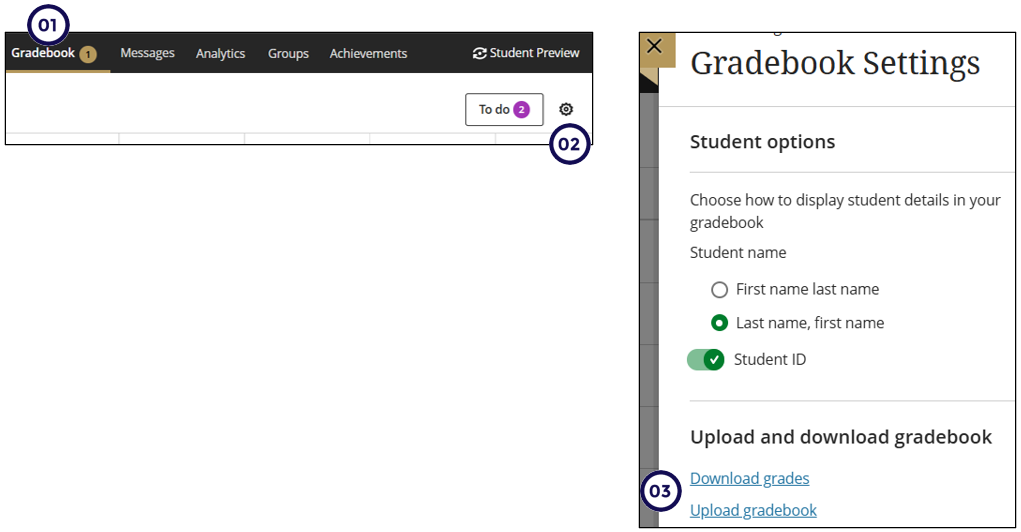
- Click on Gradebook.
- Click on the Gear icon to open the Gradebook settings panel.
- Choose the download option.
The "Upload Gradebook" panel includes the following options:
1. Drop File: A hotspot where you can drop the file you would like to upload.
2. Upload Local File: Click here to select the file you would like to upload from your computer (.xls or .csv).
3. Content Collection: Click here if the file you would like to upload has been uploaded to the Content Collection.
Assignments with Single Attempts
- Ungraded Attempts. When an ungraded attempt is found, the grade is stored at the attempt level, the Needs Grading and New Submission flags are cleared, and any auto-zero is removed.
- Graded Attempts. If the attempt is already graded, the existing grade is updated accordingly.
- Existing Overrides. If an override already exists, only the override is updated. No changes are made to the attempt grade.
- No Submission. If a student has not submitted an attempt, the grade is stored as an override.
Assignments with Multiple Attempts
- Ungraded Attempts. If all attempts are ungraded, the grade is assigned to the appropriate attempt based on the aggregation model:
- First: The grade is assigned to the first attempt.
- Last: The grade is assigned to the last attempt.
- All (Min, Max, & Average): The grade is assigned to the last attempt. All other attempts are excluded.
- Single Graded Attempt. For a single graded attempt, the existing grade is updated.
- Multiple Graded Attempts. If more than one attempt is graded, the grade is stored as an override. The Needs Grading and New Submission labels remain unchanged.
- Existing Overrides. If an override already exists, the override grade is updated.
- No Submission. For students with no submission, the grade is stored as an override.
Discussions and Journals
- Ungraded Submissions. For ungraded submissions, the grade and feedback are added to the submission, and the Needs Grading and New Submission flags are cleared.
- Graded Submissions. If the submission is already graded, the grade and feedback are updated.
- Overrides. If a student has an override grade, the override grade and feedback are updated.