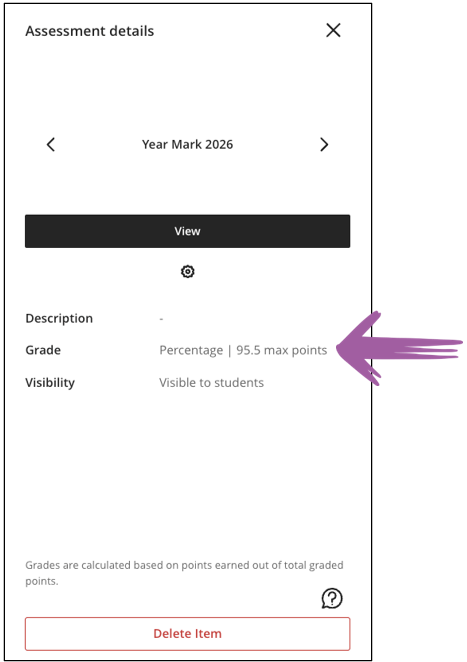
A weighted Gradebook calculation can be set up to give a mark out of 100, with weights that add up to 100%, while Assessment details shows a different maximum points value. In the screenshot below, Year Mark 2026 shows 95.5 max points. It is set up as weighted calculations out of 100.
Use the interactive tool below to explore why these numbers might differ. You can change the maximum points and percentage weights and see how they affect the illustrative maximum.
How to use the calculator
- Enter the maximum points and weight for each assessment or category. In the example, the 21 class tests are represented by one category with a maximum of 10 points and a combined weight of 5%. Enter those values once for the category.
- Review the Year Mark example. The assessment weights add up to 100%, and the tool shows an illustrative maximum of 95.5 points. Compare this with the value in the Year Mark screenshot.
- Review the Final Mark example. The Year Mark contributes 60%, and the exam is out of 100 points and contributes 40%. When the tool uses the Year Mark’s illustrative maximum of 95.5 points in this calculation, it shows an illustrative maximum of 97.3 points.
Conclusion
The tool illustrates one possible explanation for the displayed maximum points. If you need help checking how student marks are calculated in your module, please contact your Instructional Designer.