The Rubric Evaluation Report gives you an aggregated view of how students performed against each criterion in a rubric for a graded activity. You can use the report to identify patterns across your whole class and use that insight to adjust your teaching or course design.
Take the following steps to access the report.
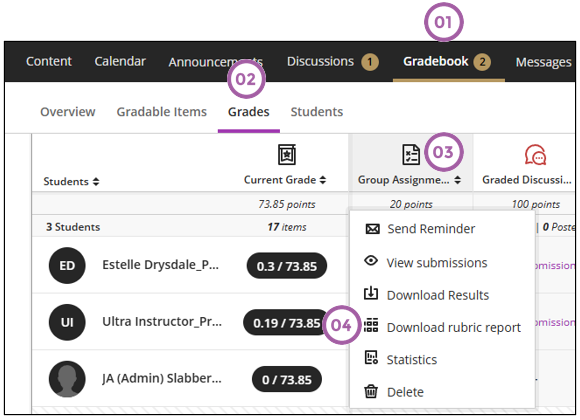
From the Grades tab:
- Click on Gradebook.
- Click on Grades.
- Click on the assessment icon where you used the rubric to evaluate the assessments.
- Click on Download rubric report.
From the Gradable Items tab:
- Click on Gradebook.
- Click on Gradable Items.
- Click on the ellipses.
- Click on Download rubric report.
Troubleshooting
If you cannot see the Download rubric report option on the assessment menu, then it could be:
- There is no rubric associated with that assessment. OR
- The grades were not posted.
If there is not enough data for the report, it will render an empty report.
Credit to Blackboard help