Note : You need the desktop version of Microsoft 365 PowerPoint installed on your computer.
Step 1: Open PowerPoint
Open the PowerPoint desktop application on the computer.
Step 2: Check your version
Windows
- Open PowerPoint.
- Select File.
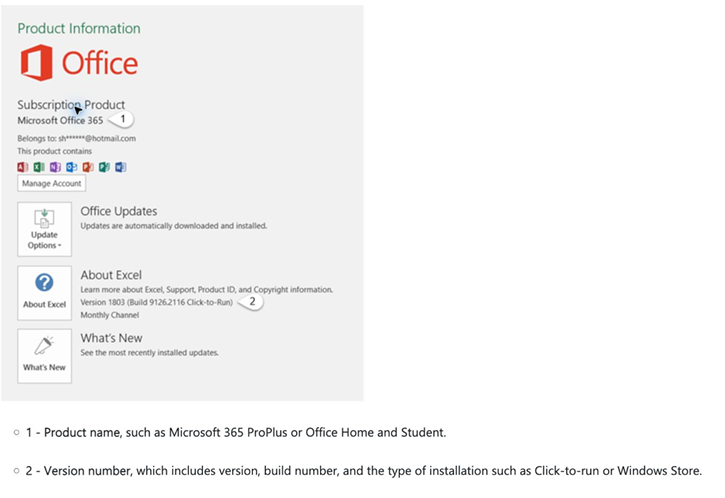
- Select Account (or Office Account).
- Look under Product Information.
- Check the name of the Microsoft Office product installed on your computer.
Microsoft Support: Find out which version of Office you are using
Mac
- Open PowerPoint.
- In the menu bar at the top of your screen, select PowerPoint.
- Select About PowerPoint.
- Check the version and licence information displayed in the window.
Microsoft Support: Find out which version of Office you are using version
Step 3: What should you do next?
**If you have Microsoft 365 desktop PowerPoint: **
Great. You are ready to continue to the Vevox PowerPoint add-in step.
**If you have Microsoft 365, but your Office applications are not up to date: **
Do not uninstall Office. First, try updating your existing Microsoft 365 installation.
Windows
- Open PowerPoint.
- Select File > Account.
- Under Product Information, select Update Options.
- Select Update Now.
- Allow Microsoft 365 to download and install any available updates.
Microsoft Support: Install Office updates
Mac
- Open PowerPoint.
- In the menu bar, select Help.
- Select Check for Updates.
- Use Microsoft AutoUpdate to install any available updates.
Microsoft Support: Update Office for Mac automatically
Before uninstalling your current version of Office, first check whether you can install Microsoft 365 using your UP Microsoft account.
An older version of Office, such as Office 2019 or Office 2021, cannot simply be changed to Microsoft 365 by installing an update. You may need to install Microsoft 365 separately using the licence linked to your UP account.
Sign in with your** UP Microsoft account** and check whether the option to install the Microsoft 365 desktop applications is available to you.
Microsoft Support: Download and install Microsoft 365 on a PC or Mac
If you cannot open desktop PowerPoint or do not have Microsoft 365, continue to the Microsoft 365 installation guidance.
Install Microsoft 365 only if needed Already have Microsoft 365 desktop PowerPoint? You do not need to reinstall it. Skip this page and continue to the Vevox PowerPoint add-in step.