Copy rubrics in the same course
Rubrics can be duplicated inside your course:
-
Click on Gradebook.
-
Click on the Settings (gear icon).
-
Scroll down to Rubrics.
-
Click on Manage course rubrics. This would display the list of already created rubrics.
-
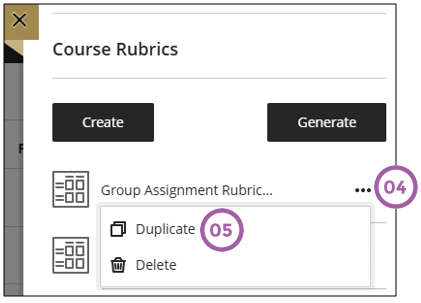
Click on the three ellipses next to the rubric you want to duplicate.
-
Select duplicate.
-
Update the copied rubric with your information.
-
Click on Save when you the rubric is ready.
Copy rubric from another course
This video shows how to copy and re-use a rubric in a current clickUP course to another (clickUP Ultra) module. It can then be used as is, or edited as needed.
Video Time: 2 min 27 sec